Showing posts with label HDFS. Show all posts

Heart Beat Mechanism

As of now, we know that once if the input file is loaded on to the Hadoop Cluster, the file is sliced into blocks, and these blocks are distributed among the cluster. 

Now Job Tracker and Task Tracker comes into picture. To process the data, Job Tracker assigns certain tasks to the Task Tracker. Let us think that, while the processing is going on one DataNode in the cluster is down. Now, NameNode should know that the certain DataNode is down , otherwise it cannot continue processing by using replicas. To make NameNode aware of the status(active / inactive) of DataNodes, each DataNode sends a "Heart Beat Signal" for every 10 minutes(Default). This mechanism is called as HEART BEAT MECHANISM.

Heart Beat

Based on this Heart Beat Signal Job Tracker assigns tasks to the Tasks Trackers which are active. If any task tracker is not able to send the signal in the span of 10 mins, Job Tracker treats it as inactive, and checks for the ideal one to assign the task. If there are no ideal Task Trackers, Job Tracker should wait until any Task Tracker becomes ideal. 

We can change the default value of Heart Beat Signal (10 minutes), by configuring in "mapred-site.xml".                            

Heart Beat Mechanism

Posted at  03:07  |  in  HDFS  |  Read More»

Heart Beat Mechanism

As of now, we know that once if the input file is loaded on to the Hadoop Cluster, the file is sliced into blocks, and these blocks are distributed among the cluster. 

Now Job Tracker and Task Tracker comes into picture. To process the data, Job Tracker assigns certain tasks to the Task Tracker. Let us think that, while the processing is going on one DataNode in the cluster is down. Now, NameNode should know that the certain DataNode is down , otherwise it cannot continue processing by using replicas. To make NameNode aware of the status(active / inactive) of DataNodes, each DataNode sends a "Heart Beat Signal" for every 10 minutes(Default). This mechanism is called as HEART BEAT MECHANISM.

Heart Beat

Based on this Heart Beat Signal Job Tracker assigns tasks to the Tasks Trackers which are active. If any task tracker is not able to send the signal in the span of 10 mins, Job Tracker treats it as inactive, and checks for the ideal one to assign the task. If there are no ideal Task Trackers, Job Tracker should wait until any Task Tracker becomes ideal. 

We can change the default value of Heart Beat Signal (10 minutes), by configuring in "mapred-site.xml".                            

put, copyFromLocal and moveFormLocal Command:

All these commands are used to copy the files from Local File System to the Hadoop File System. put and copyFormLocal Commands copy the file by keeping the original, but moveFromLocal deletes the original and moves the file to Hadoop File System. The following are the syntax of all the three commands.
  • -put <localsrc>  <dst>
  • -copyFromLocal <localsrc>  <dst>
  • -moveFromLocal <localsrc>  <dst>

The following figures shows you the examples of all the three commands.

Hadoop -put command
Hadoop -put Command

Hadoop -copyFromLocal Command
Hadoop -moveFromLocal Command
        

put, copyFromLocal and moveFormLocal Command

Posted at  00:51  |  in  HDFS  |  Read More»

put, copyFromLocal and moveFormLocal Command:

All these commands are used to copy the files from Local File System to the Hadoop File System. put and copyFormLocal Commands copy the file by keeping the original, but moveFromLocal deletes the original and moves the file to Hadoop File System. The following are the syntax of all the three commands.
  • -put <localsrc>  <dst>
  • -copyFromLocal <localsrc>  <dst>
  • -moveFromLocal <localsrc>  <dst>

The following figures shows you the examples of all the three commands.

Hadoop -put command
Hadoop -put Command

Hadoop -copyFromLocal Command
Hadoop -moveFromLocal Command
        

-rm Command: 

This command deletes/removes the file from the directory. The following is the syntax of rm command.
  • -rm <src>
The -skipTrash option bypasses trash, if enabled, and immediately deletes <src>. The following figure shows you the example. 
 
Hadoop -rm Command
Hadoop -rm Command

-rmr Command:

This command deletes/removes entire directory from the File System. The following is the syntax of rmr command.
  • -rmr <src>
The -skipTrash option bypasses trash, if enabled, and immediately deletes <src>. The following figure shows you the example. 

Hadoop -rmr Command
Hadoop -rmr Command


Remove and Recursive Remove Command in Hadoop

Posted at  00:34  |  in  HDFS  |  Read More»

-rm Command: 

This command deletes/removes the file from the directory. The following is the syntax of rm command.
  • -rm <src>
The -skipTrash option bypasses trash, if enabled, and immediately deletes <src>. The following figure shows you the example. 
 
Hadoop -rm Command
Hadoop -rm Command

-rmr Command:

This command deletes/removes entire directory from the File System. The following is the syntax of rmr command.
  • -rmr <src>
The -skipTrash option bypasses trash, if enabled, and immediately deletes <src>. The following figure shows you the example. 

Hadoop -rmr Command
Hadoop -rmr Command


-mv Command:

This command is used to move the contents from source to destination. This command is even used for renaming. When moving multiple files, the destination must be a Directory.The following is the syntax of move command.
  • -mv <src> <dst>
here, src represent Source, and dst represent Destination.

Hadoop -mv command
Hadoop -mv command
In the above figure, /user/root/emp1/part-m-00000 is the source file, where as /Mydir2 is the destination.

-cp Command:

This command is used to copy the file from source to destination. When copying multiple files, the destination must be a Directory. The following is the syntax of copy command.
  • -cp <src> <dst>

Hadoop cp command
Hadoop cp command

move and copy commands of Hadoop

Posted at  05:29  |  in  HDFS  |  Read More»

-mv Command:

This command is used to move the contents from source to destination. This command is even used for renaming. When moving multiple files, the destination must be a Directory.The following is the syntax of move command.
  • -mv <src> <dst>
here, src represent Source, and dst represent Destination.

Hadoop -mv command
Hadoop -mv command
In the above figure, /user/root/emp1/part-m-00000 is the source file, where as /Mydir2 is the destination.

-cp Command:

This command is used to copy the file from source to destination. When copying multiple files, the destination must be a Directory. The following is the syntax of copy command.
  • -cp <src> <dst>

Hadoop cp command
Hadoop cp command

df Command: 

This command shows the capacity, free and used space of the filesystem. If the filesystem has multiple partitions, and no path to a particular partition is specified, then the status of the root partitions will be shown. The following figure shows the example for df command:
Hadoop df command
Hadoop df command

du Command: 

This command shows the amount of space, in bytes, used by the files that match the specified file pattern. This command is equivalent to the unix command "du -sb <path>/*" in case of a directory, and to "du -b <path>" in case of a file. The output is in the form name(full path) size (in bytes). The following figure shows the example for du command:

Hadoop du command
Hadoop du command

dus Command:

This command show the amount of space, in bytes, used by the files that match the specified file pattern. This command is equivalent to the unix command "du -sb"  The output is in the form name(full path) size (in bytes). The following figure shows the example for dus command:

Hadoop dus command
Hadoop dus command

Hadoop df, du, dus Commands

Posted at  05:13  |  in  HDFS  |  Read More»

df Command: 

This command shows the capacity, free and used space of the filesystem. If the filesystem has multiple partitions, and no path to a particular partition is specified, then the status of the root partitions will be shown. The following figure shows the example for df command:
Hadoop df command
Hadoop df command

du Command: 

This command shows the amount of space, in bytes, used by the files that match the specified file pattern. This command is equivalent to the unix command "du -sb <path>/*" in case of a directory, and to "du -b <path>" in case of a file. The output is in the form name(full path) size (in bytes). The following figure shows the example for du command:

Hadoop du command
Hadoop du command

dus Command:

This command show the amount of space, in bytes, used by the files that match the specified file pattern. This command is equivalent to the unix command "du -sb"  The output is in the form name(full path) size (in bytes). The following figure shows the example for dus command:

Hadoop dus command
Hadoop dus command

ls Command:

      This command is used for listing the contents that match the specified file pattern. The following is the syntax of this command.
  • -ls <path>
In the above syntax, if the path is not specified, this command will list the contents of /user/<currentUser>. If the path is specified then this command will list the contents of specified path. The following figure shows the usage of -ls command on top of HDFS.

Hadoop ls command
Hadoop ls command
In this figure, we did not specified any path, so, the contents of the current directory are listed.

lsr command: 

This command is used to Recursively list the contents that match the specified file pattern. It behaves very similarly to hadoop fs -ls, except that the data is shown for all the entries in the subtree. The following is the systax for lsr command:
  • -lsr <path>
This command also can be used with out specifying the path. The following two figures show the examples:
Hadoop lsr command without path
Hadoop lsr command with path

hadoop ls, lsr commands

Posted at  04:49  |  in  HDFS  |  Read More»

ls Command:

      This command is used for listing the contents that match the specified file pattern. The following is the syntax of this command.
  • -ls <path>
In the above syntax, if the path is not specified, this command will list the contents of /user/<currentUser>. If the path is specified then this command will list the contents of specified path. The following figure shows the usage of -ls command on top of HDFS.

Hadoop ls command
Hadoop ls command
In this figure, we did not specified any path, so, the contents of the current directory are listed.

lsr command: 

This command is used to Recursively list the contents that match the specified file pattern. It behaves very similarly to hadoop fs -ls, except that the data is shown for all the entries in the subtree. The following is the systax for lsr command:
  • -lsr <path>
This command also can be used with out specifying the path. The following two figures show the examples:
Hadoop lsr command without path
Hadoop lsr command with path

To interact with Hadoop File System we have a set of Commands called Hadoop CLI (Commnad Line Interface) Commnads. Using these commands we can easily work with HDFS environment. The following are the Commands, click on each to know in detail: 

-ls      

-lsr

-df

-du

-dus

-mv

-cp

-rm

-rmr

-put

-copyFromLocal

-moveFromLocal

-get

-getmerge

-cat

-copyToLocal

-moveToLocal

 -mkdir

-setrep

-tail

-touchz

-test

-text

-stat

-chmod

-chown

-chgrp

-count

-help


Hadoop CLI Commnads

Posted at  04:20  |  in  HDFS  |  Read More»

To interact with Hadoop File System we have a set of Commands called Hadoop CLI (Commnad Line Interface) Commnads. Using these commands we can easily work with HDFS environment. The following are the Commands, click on each to know in detail: 

-ls      

-lsr

-df

-du

-dus

-mv

-cp

-rm

-rmr

-put

-copyFromLocal

-moveFromLocal

-get

-getmerge

-cat

-copyToLocal

-moveToLocal

 -mkdir

-setrep

-tail

-touchz

-test

-text

-stat

-chmod

-chown

-chgrp

-count

-help


Hadoop cluster has two types of nodes, they are:
  • Namenode
  • Datanode
In the Hadoop cluster Master node is called as Namenode and the slave nodes are called as Datanodes. Let us see them in detail,

Namenode: 

This node is considered as the primary node in the HDFS cluster. All the operations of HDFS cluster is maintained by this node, there will be only one Namenode for the entire HDFS Cluster. Namenode stores the metadata information(information about block storage, replication etc..,), this information is stored persistently on the local disk in the form of two files FSImage/Namespace Image and edit log.

Datanode:

Datanodes acts as slaves in HDFS Cluster. The number of these datanodes will be based on the amount of data that is being stored on the cluster. The work of Datanode will be based on the Namenode instructions. Datanodes store and retrieve data when they are asked to do so either by the Namenode or by the client. At the time of processing the data , these nodes report back to the Namenode periodically using Heart Beat Mechanism

Here, when we consider the Namenode, it was said that there will be only one Namenode in the Hadoop HDFS cluster, and this Namenode is responsible for the whole maintenance. If it is so, What if this Namenode goes down? 
To tolerate this situation we have Secondary Namenode , let us see that in detail.

Secondary Namenode:

Secondary Namenode is not considered as a direct replacement for Namenode. The main role of this Secondary Namenode is periodically merge the FSImage and editlog to prevent the edit log from becoming very large. Secondary Namenode runs on a separate physical system because it requires huge memory to merge the two files. It keeps a copy of merged file in its local file system, in-order to use when the Namenode fails.

Namenode, Secondary Namenode and Datanodes

Posted at  08:27  |  in  HDFS  |  Read More»

Hadoop cluster has two types of nodes, they are:
  • Namenode
  • Datanode
In the Hadoop cluster Master node is called as Namenode and the slave nodes are called as Datanodes. Let us see them in detail,

Namenode: 

This node is considered as the primary node in the HDFS cluster. All the operations of HDFS cluster is maintained by this node, there will be only one Namenode for the entire HDFS Cluster. Namenode stores the metadata information(information about block storage, replication etc..,), this information is stored persistently on the local disk in the form of two files FSImage/Namespace Image and edit log.

Datanode:

Datanodes acts as slaves in HDFS Cluster. The number of these datanodes will be based on the amount of data that is being stored on the cluster. The work of Datanode will be based on the Namenode instructions. Datanodes store and retrieve data when they are asked to do so either by the Namenode or by the client. At the time of processing the data , these nodes report back to the Namenode periodically using Heart Beat Mechanism

Here, when we consider the Namenode, it was said that there will be only one Namenode in the Hadoop HDFS cluster, and this Namenode is responsible for the whole maintenance. If it is so, What if this Namenode goes down? 
To tolerate this situation we have Secondary Namenode , let us see that in detail.

Secondary Namenode:

Secondary Namenode is not considered as a direct replacement for Namenode. The main role of this Secondary Namenode is periodically merge the FSImage and editlog to prevent the edit log from becoming very large. Secondary Namenode runs on a separate physical system because it requires huge memory to merge the two files. It keeps a copy of merged file in its local file system, in-order to use when the Namenode fails.

In Hadoop we have mainly 6 configuration files, they are:
  • core-site.xml

  • mapred-site.xml

  • hdfs-site.xml

  • Masters

  • Slaves

  • hadoop-env.sh

core-site.xml:

This file contains the information like, where exactly the Name Node is running and the default port number of Name Node. The default port number of Name Node is 8020. 

core-site.xml
In the above file 'fs.default.name' is the name of Name Node. The <value> contains the url of Name Node. In this file the Name Node information is Mandatory. 

mapred-site.xml:

This file contains the information regarding Job Tracker daemon. In this file Job Tracker Information is mandatory.

mapred-site.xml

hdfs-site.xml: 

This file contains the information of block size, replication factor etc.., In this file Replication factor information is mandatory, because when we use a single node cluster, we cannot have the replication factor as 3.

hdfs-site.xml

Masters:

This file contains the information about the master nodes. If the Name Node is down, this files tells us which node should be treated as Secondary Name Node.

Slaves: 

This file contains the information about slave nodes. Information in the sense, the number of nodes and their names and addresses.

hadoop-env.sh:

This file contains all the environment variables like HADOOP_HOME(hadoop installation directory), JAVA HOME etc..,                               

Configuration Files

Posted at  07:37  |  in  HDFS  |  Read More»

In Hadoop we have mainly 6 configuration files, they are:
  • core-site.xml

  • mapred-site.xml

  • hdfs-site.xml

  • Masters

  • Slaves

  • hadoop-env.sh

core-site.xml:

This file contains the information like, where exactly the Name Node is running and the default port number of Name Node. The default port number of Name Node is 8020. 

core-site.xml
In the above file 'fs.default.name' is the name of Name Node. The <value> contains the url of Name Node. In this file the Name Node information is Mandatory. 

mapred-site.xml:

This file contains the information regarding Job Tracker daemon. In this file Job Tracker Information is mandatory.

mapred-site.xml

hdfs-site.xml: 

This file contains the information of block size, replication factor etc.., In this file Replication factor information is mandatory, because when we use a single node cluster, we cannot have the replication factor as 3.

hdfs-site.xml

Masters:

This file contains the information about the master nodes. If the Name Node is down, this files tells us which node should be treated as Secondary Name Node.

Slaves: 

This file contains the information about slave nodes. Information in the sense, the number of nodes and their names and addresses.

hadoop-env.sh:

This file contains all the environment variables like HADOOP_HOME(hadoop installation directory), JAVA HOME etc..,                               

Generally when we start our computer it will take nearly 1 to 2 minutes of time to load some built in processes. At this time we cannot do any operation like mouse click, typing etc.., at this time we call that our computer is in SAFE MODE

In the same way when we start our Name Node it loads the following files:
  • Loads system config
  • Reasonable Replication
  • System dependent files

Safemode

Posted at  07:09  |  in  HDFS  |  Read More»

Generally when we start our computer it will take nearly 1 to 2 minutes of time to load some built in processes. At this time we cannot do any operation like mouse click, typing etc.., at this time we call that our computer is in SAFE MODE

In the same way when we start our Name Node it loads the following files:
  • Loads system config
  • Reasonable Replication
  • System dependent files

Replication means Duplication, Hadoop is famous for its storage technique. Generally once when we load the file on top of HDFS it divides the file into blocks of equal size. By default this block size is 64mb. Hadoop maintains 3 duplicates of each block, that means if we want to store file of size 1TB on HDFS, we need a hardware to store 3TB. Each block will be stored on three different data nodes.

Suppose at the time of processing the data if any data node dies the name node uses any one of the remaining two replicated blocks and makes the processing continuous without any breaks. Let us take an example: suppose if our file is divided into 5 blocks, each block will be stored on three different data nodes and all the metadata information will be saved in Name Node as shown in following figure.


Now after we have started processing, if Data Node 2 goes down (because of any hardware failure, or some other) we will loss three blocks (B1, B5, B2) then immediately Name Node checks for replicated blocks and continues processing.                       

Replication

Posted at  10:05  |  in  HDFS  |  Read More»

Replication means Duplication, Hadoop is famous for its storage technique. Generally once when we load the file on top of HDFS it divides the file into blocks of equal size. By default this block size is 64mb. Hadoop maintains 3 duplicates of each block, that means if we want to store file of size 1TB on HDFS, we need a hardware to store 3TB. Each block will be stored on three different data nodes.

Suppose at the time of processing the data if any data node dies the name node uses any one of the remaining two replicated blocks and makes the processing continuous without any breaks. Let us take an example: suppose if our file is divided into 5 blocks, each block will be stored on three different data nodes and all the metadata information will be saved in Name Node as shown in following figure.


Now after we have started processing, if Data Node 2 goes down (because of any hardware failure, or some other) we will loss three blocks (B1, B5, B2) then immediately Name Node checks for replicated blocks and continues processing.                       

HDFS is a filesystem designed for storing huge amount of data. The following are the features of HDFS.

Support very large files: this is the major feature of HDFS. Hadoop clusters that are running today are able to store huge amount of data even Petabytes and Zetabytes. 

Commodity Hardware: HDFS require only commodity hardware. Commodity hardware in the sense, the hardware which is available for most of the vendors. This does not need high configured hardware.

Multiple Writers, arbitrary file modifications: Once if the file is stored on top of HDFS cluster, we cannot write the data on that file. In HDFS multiple writers are not encouraged. If we want to do so, you must delete the file on HDFS, update it in local file system and then again place it in HDFS cluster.Hadoop is a Write once - Read many times mechanism.

High Latency: Latency means, the amount of time taken to fetch the data. High latency in HDFS might be because it contains more number of nodes(1000+ for some huge amount of data). Suppose, if we consider RDBMS, when we pose the query we may get the data in 0.01 seconds, but in hadoop it may take 0.11 seconds. This High latency is one of the limitation of Hadoop.

Streaming data access(Sequential flow of data access): Suppose if we want to access the data from the 1500th line, we need to process the data from line one to 1500 unnecessarily. In hadoop we cannot access the data Randomly. This is another drawback of Hadoop. To overcome this HBASE is introduced.                

Features of HDFS

Posted at  07:27  |  in  HDFS  |  Read More»

HDFS is a filesystem designed for storing huge amount of data. The following are the features of HDFS.

Support very large files: this is the major feature of HDFS. Hadoop clusters that are running today are able to store huge amount of data even Petabytes and Zetabytes. 

Commodity Hardware: HDFS require only commodity hardware. Commodity hardware in the sense, the hardware which is available for most of the vendors. This does not need high configured hardware.

Multiple Writers, arbitrary file modifications: Once if the file is stored on top of HDFS cluster, we cannot write the data on that file. In HDFS multiple writers are not encouraged. If we want to do so, you must delete the file on HDFS, update it in local file system and then again place it in HDFS cluster.Hadoop is a Write once - Read many times mechanism.

High Latency: Latency means, the amount of time taken to fetch the data. High latency in HDFS might be because it contains more number of nodes(1000+ for some huge amount of data). Suppose, if we consider RDBMS, when we pose the query we may get the data in 0.01 seconds, but in hadoop it may take 0.11 seconds. This High latency is one of the limitation of Hadoop.

Streaming data access(Sequential flow of data access): Suppose if we want to access the data from the 1500th line, we need to process the data from line one to 1500 unnecessarily. In hadoop we cannot access the data Randomly. This is another drawback of Hadoop. To overcome this HBASE is introduced.                


There are 5 different daemons in Hadoop Architecture. Daemons mean the processes which are running in background.

  • Name Node
  • Secondary Name Node
  • Data Node
  • Job Tracker
  • Task Tracker


Name Node: This Node plays an important and major role in HDFS Cluster. Before knowing about this node, let us first know about the different distribution mechanisms which can be used in Hadoop.

  • CDH (Cloudera Distribution for Hadoop)
  • Map R
  • Horton Works

Currently we are using CDH in our realtime projects; the drawback in CDH is SPOF (Single Point Of Failure). In CDH mechanism at any point of time there will be only one Name Node in the cluster.


The Name Node stores only the Metadata. That means it stores only the physical location of the data. The processing in the data nodes will be done based on the instruction of Name Node.


Secondary Name Node: This Node is never referred a direct backup to the Name Node. It is just responsible for housekeeping activities. It copies the files like “FSImage” and “EditLog” from Name Node. These two files contain the information regarding Metadata. Once if the Name node is down Secondary Name Node comes into picture. This just maintains the cluster until the Name Node is recovered. To know more about Secondary Name node have a look at Namenode, Secondary Namenode and Datanodes.


Data Node: These Nodes stores the actual blocks of data. There is no limit for the number of Data Nodes in the cluster. Atleast a cluster should have one data node. There is no particular fixed configuration for the Data Node. To know more about Datanode have a look at Namenode, Secondary Namenode and Datanodes.


Job Tracker: This is meant for assigning and scheduling tasks.


Task Tracker: This is meant for executing task assigned by Job Tracker. Communication between Job Tracker and Task Tracker is done by using Map Reduce jobs. 

Hadoop Architecture

Posted at  08:56  |  in  HDFS  |  Read More»


There are 5 different daemons in Hadoop Architecture. Daemons mean the processes which are running in background.

  • Name Node
  • Secondary Name Node
  • Data Node
  • Job Tracker
  • Task Tracker


Name Node: This Node plays an important and major role in HDFS Cluster. Before knowing about this node, let us first know about the different distribution mechanisms which can be used in Hadoop.

  • CDH (Cloudera Distribution for Hadoop)
  • Map R
  • Horton Works

Currently we are using CDH in our realtime projects; the drawback in CDH is SPOF (Single Point Of Failure). In CDH mechanism at any point of time there will be only one Name Node in the cluster.


The Name Node stores only the Metadata. That means it stores only the physical location of the data. The processing in the data nodes will be done based on the instruction of Name Node.


Secondary Name Node: This Node is never referred a direct backup to the Name Node. It is just responsible for housekeeping activities. It copies the files like “FSImage” and “EditLog” from Name Node. These two files contain the information regarding Metadata. Once if the Name node is down Secondary Name Node comes into picture. This just maintains the cluster until the Name Node is recovered. To know more about Secondary Name node have a look at Namenode, Secondary Namenode and Datanodes.


Data Node: These Nodes stores the actual blocks of data. There is no limit for the number of Data Nodes in the cluster. Atleast a cluster should have one data node. There is no particular fixed configuration for the Data Node. To know more about Datanode have a look at Namenode, Secondary Namenode and Datanodes.


Job Tracker: This is meant for assigning and scheduling tasks.


Task Tracker: This is meant for executing task assigned by Job Tracker. Communication between Job Tracker and Task Tracker is done by using Map Reduce jobs. 


      Now let us see how exactly the data is getting stored in the HDFS Cluster? Suppose let us think that HadoopData.txt is the file which contains the data to be processed. Once if this file is loaded into the HDFS Cluster, the Name Node divides the file into Blocks. All these blocks are of equal size, by default the size of each block is 64MB. 

      Let me explain clearly, suppose let us think our HadoopData.txt file is of size 400MB (Note: generally input to HDFS will be in TB/PB, here 400mb is taken for our understanding). This file is divided into 7 blocks. The following figure shows you clearly...

blocks


How exactly the data is stored on HDFS Cluster?

Posted at  08:53  |  in  HDFS  |  Read More»


      Now let us see how exactly the data is getting stored in the HDFS Cluster? Suppose let us think that HadoopData.txt is the file which contains the data to be processed. Once if this file is loaded into the HDFS Cluster, the Name Node divides the file into Blocks. All these blocks are of equal size, by default the size of each block is 64MB. 

      Let me explain clearly, suppose let us think our HadoopData.txt file is of size 400MB (Note: generally input to HDFS will be in TB/PB, here 400mb is taken for our understanding). This file is divided into 7 blocks. The following figure shows you clearly...

blocks


      Hadoop is most popularly known for its storage.  It uses HDFS (HadoopDistribution File System) for storing such huge amount of data. HDFS has some unique features which made Hadoop to stand first to store BIGDATA. We will go through those features in our further posts.

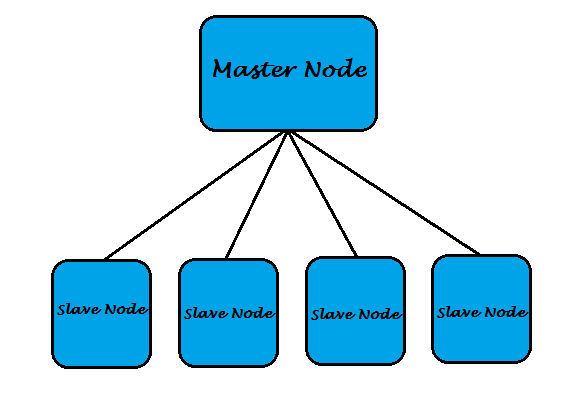
       HDFS is a clustered structure which consists of one Master Node and some Slave Nodes. The following is the typical structure of HDFS Cluster.


HDFS cluster
    

Getting Started with HDFS

Posted at  08:51  |  in  HDFS  |  Read More»

      Hadoop is most popularly known for its storage.  It uses HDFS (HadoopDistribution File System) for storing such huge amount of data. HDFS has some unique features which made Hadoop to stand first to store BIGDATA. We will go through those features in our further posts.

       HDFS is a clustered structure which consists of one Master Node and some Slave Nodes. The following is the typical structure of HDFS Cluster.


HDFS cluster


       Now a days we are getting a huge amount of data (terabytes to petabytes), where we are facing a big problem in storing and processing such huge amount of data. We call this huge amount of data as BIGDATA. Bigdata is the growing challenge that organization facing now a days. 
      To overcome from this problem Google has released white papers GFS (Google File System) and Map Reduce in 2000’s. Based on those papers Doug Cutting developed a new framework called HADOOP. This has got this name from the yellow colored Elephant Toy named Hadoop, with which Doug Cutting's son is used to play. Officially this was got released into the market on 15th Feb, 2011. 
Hadoop Tutor blog

Hadoop Introduction

Posted at  08:47  |  in  HDFS  |  Read More»


       Now a days we are getting a huge amount of data (terabytes to petabytes), where we are facing a big problem in storing and processing such huge amount of data. We call this huge amount of data as BIGDATA. Bigdata is the growing challenge that organization facing now a days. 
      To overcome from this problem Google has released white papers GFS (Google File System) and Map Reduce in 2000’s. Based on those papers Doug Cutting developed a new framework called HADOOP. This has got this name from the yellow colored Elephant Toy named Hadoop, with which Doug Cutting's son is used to play. Officially this was got released into the market on 15th Feb, 2011. 
Hadoop Tutor blog

About-Privacy Policy-Contact us
Copyright © 2013 Hadoop Tutor. Blogger Template by Bloggertheme9
Proudly Powered by Blogger.
back to top